Curated question and answer pairs
A Q&A pair is a question plus the exact answer you want returned. Add one when chat keeps answering a common question badly: only the question is matched against what someone asks, and your answer goes back word for word.
- The Knowledge Base app in your top bar.
- These permissions: Knowledge Base · Document - Create, Knowledge Base · Document - Update, Knowledge Base · Document - Delete.
- A knowledge base. Adding and importing need Create, editing and changing access need Update, removing needs Delete.
If Knowledge Base isn't in your top bar, your role can't view it or your plan doesn't include it. Ask a workspace administrator, or see Permissions and module visibility.
Steps
Open the Q&A list
Open the knowledge base and select Q&A in its menu. Each row shows the Question, an Answer preview, its Access and when it was Added.
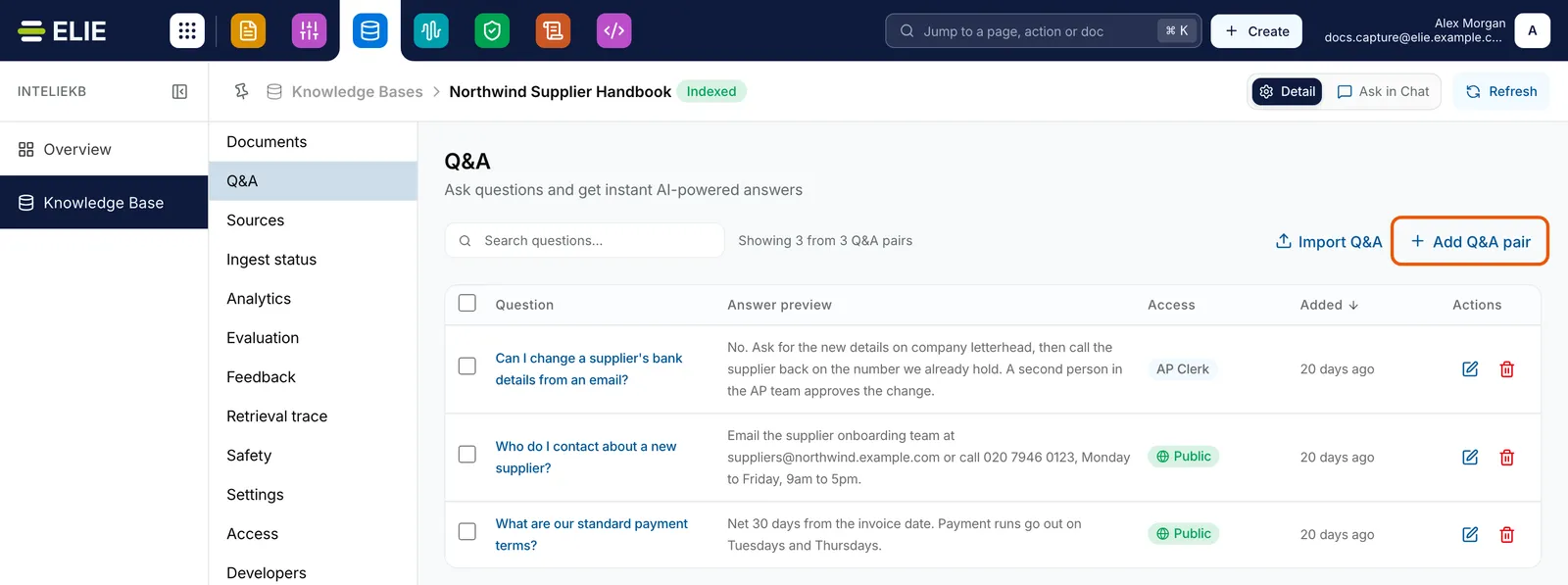
The Q&A section of Northwind Supplier Handbook with three pairs and their Access, and the Add Q&A pair button ringed. EnlargeWrite the pair
Select Add Q&A pair. On the page that opens, write the Question in the words a person would type in chat. Under Answer, write the complete reply, up to 20,000 characters; it is shown exactly as written, line breaks and links included.
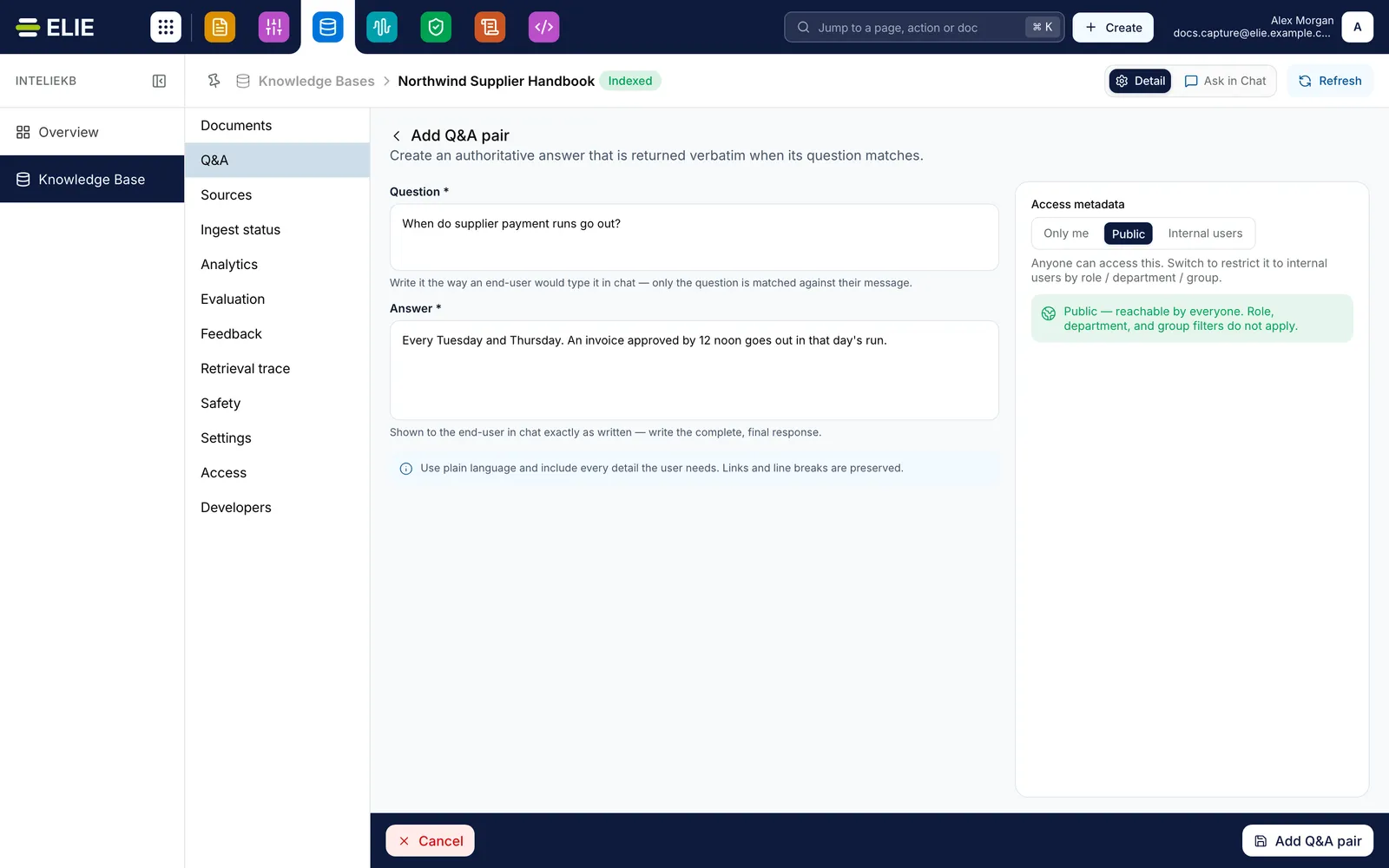
The Add Q&A pair page with the question When do supplier payment runs go out?, its answer, and Public chosen under Access metadata. EnlargeSet who can reach it
Under Access metadata, choose Only me, Public, or Internal users and pick an Access role, Department or People group. Only me, or Internal users with nothing picked, reaches only you and tenant administrators.
Save it
Select Add Q&A pair at the foot of the page. You return to the list, and the pair answers once it has been indexed, which takes a moment.
Change it later
Select its question, or Edit on its row, to open Edit Q&A pair, then select Save changes. To change access on several, tick them and select Reassign access. To remove one, select its bin and confirm Remove; Remove selected removes every ticked pair.


What success looks like
- A confirmation starting Q&A pair created appears and the pair heads the Q&A list.
- On Ingest status, a row titled with your question and labelled Q&A pair reaches Indexed.
- Asking that question in chat returns your wording, citing the Q&A pair as its source.

Importing pairs in bulk
Select Import Q&A. The page shows the Expected format: a header row with question and
answer columns, then one pair per row; Download sample.csv gives you a starting file. Add a
.csv, .xlsx or .xls file of up to 100 MB under Q&A file. It is checked as you add it:
Ready with the number of pairs detected, or Fix needed when a row is missing its question
or answer, which keeps Import greyed out. Set Access metadata for every pair in it, then
select Import.

Import results counts Imported, Skipped and Errors, with a line per row. A question already in the knowledge base, or repeated in the file, is skipped. A row the server refuses, such as an answer over 20,000 characters, is an error, and one error stops the whole file: Import rejected: 2 row(s) have errors. Fix and re-upload. Nothing is imported until every row passes.
If something goes wrong
| Symptom | Likely cause | What to do |
|---|---|---|
| The save button stays greyed out. | Question or Answer is empty (Question is required, Answer is required), or nothing has changed yet. | Fill both, or make a change. |
| A message says a Q&A pair with this question already exists. | Questions must be unique in a knowledge base. | Edit the existing pair instead. |
| Chat still answers from documents. | The question asked was not close enough to yours. | On Settings, set Q&A matching to Low (Lenient) to catch looser wording. See Knowledge base settings. |
| Colleagues get a generated answer while you get the curated one. | The pair's access doesn't reach them. | Reopen the pair and widen Access metadata, or choose Public. |
| Add Q&A pair or Import Q&A is greyed out. | Your role lacks Knowledge Base · Document - Create. | Ask a workspace administrator. |
Next
- Asking a question and reading the answer - where a curated answer appears.
- Ingest statuses explained - watching a pair index.
- Knowledge base settings - the Q&A matching strictness.