Developer access and widget tokens
Developers holds two things: a reference for the knowledge base's API, and the Embeddable widget, a chat launcher you can put on your own website. The widget signs in with a scoped token that you issue here and that is shown to you once.
- The Knowledge Base app in your top bar.
- These permissions: Knowledge Base · Setup - Create, Knowledge Base · Setup - Delete.
- The section appears with Knowledge Base · Setup - Read. Issuing a token needs Setup - Create, revoking one needs Setup - Delete. Know the exact address (scheme, host and port) of each page that will show the widget.
If Knowledge Base isn't in your top bar, your role can't view it or your plan doesn't include it. Ask a workspace administrator, or see Permissions and module visibility.
Steps
Open Developers
Open the knowledge base and select Developers. It opens on API reference: the Base URL and KB id, then each of the Endpoints with its Required permission and a Try It! or View button. MCP server is marked Coming soon.
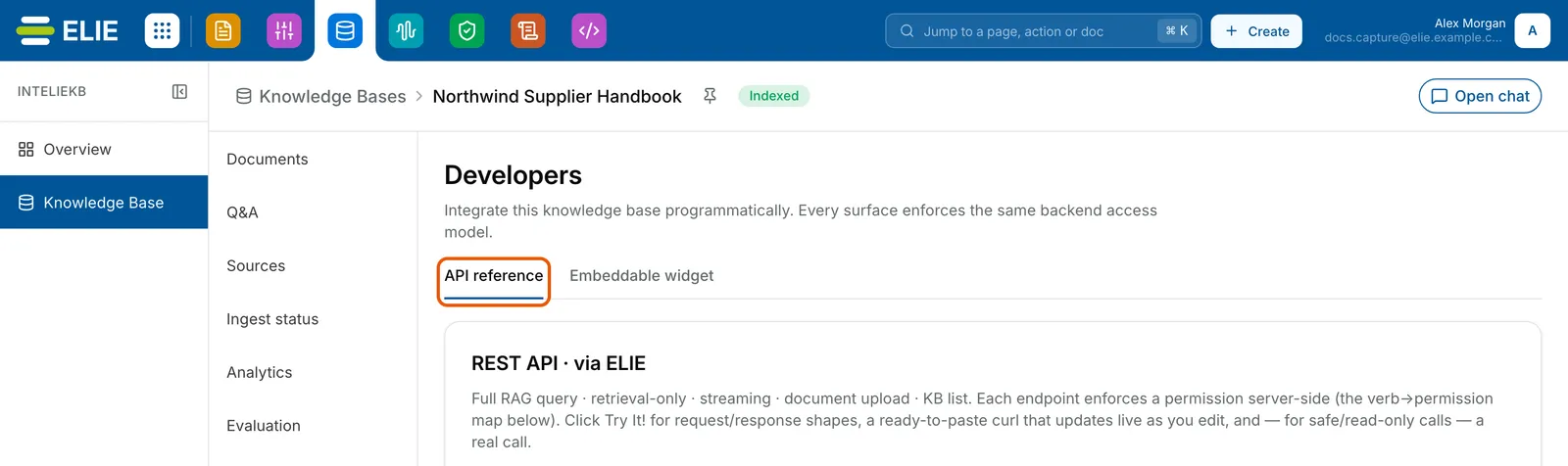
The Developers section of Northwind Supplier Handbook with the API reference tab ringed beside Embeddable widget. EnlargeStart the embed code
Select Embeddable widget, then Get embed code. The Embed the chat widget dialog opens.
Set how it looks
Check the Knowledge base it answers from, then choose a Launcher position (Bottom-right or Bottom-left) and a Brand colour.
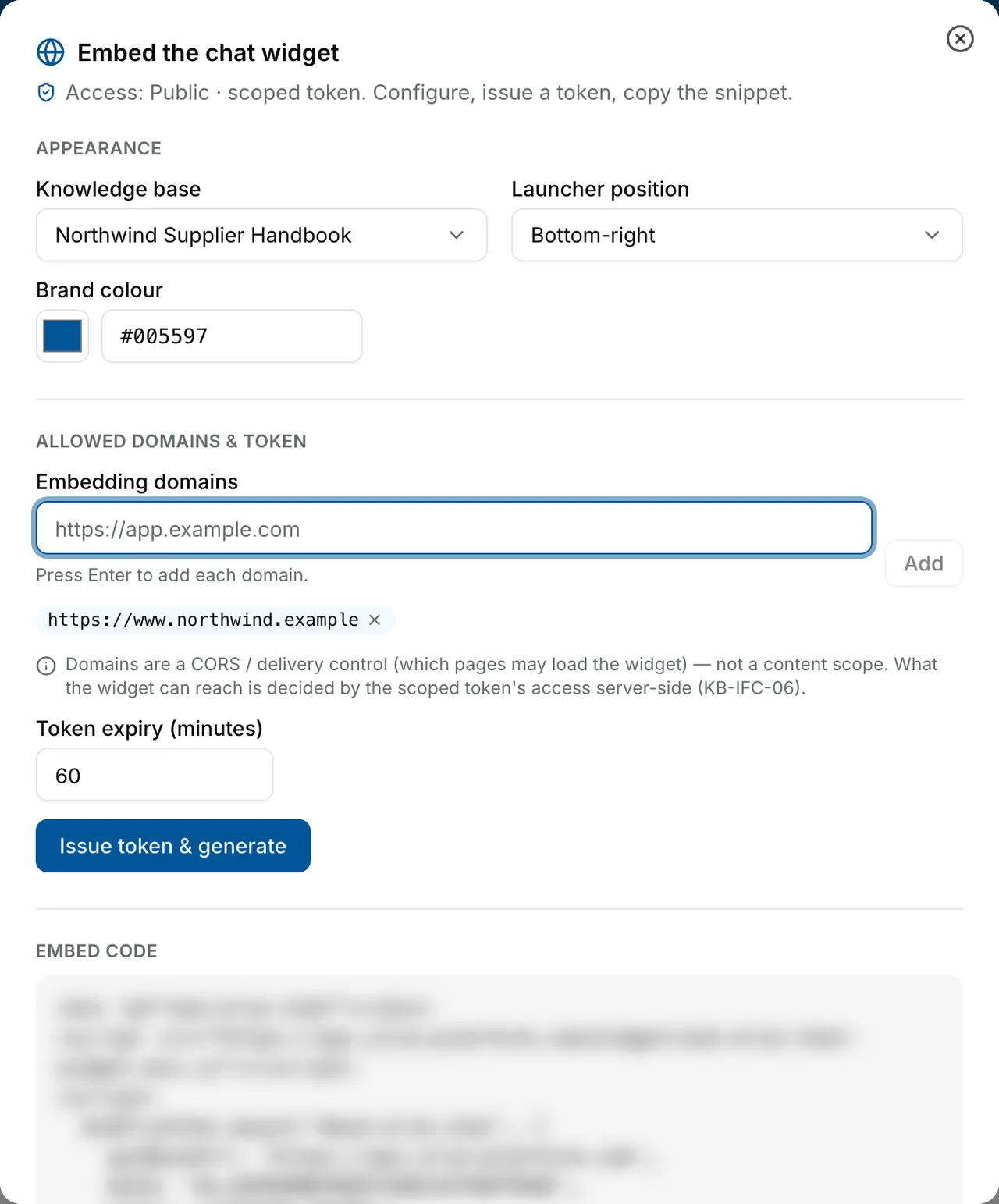
The Embed the chat widget dialog: Knowledge base Northwind Supplier Handbook, Launcher position Bottom-right, a brand colour, https://www.northwind.example under Embedding domains, Token expiry 60 and Issue token & generate. The embed code below is blurred. Allow your sites
Type each site address into Embedding domains and press Enter after each. Set Token expiry (minutes).
Issue the token and copy the code
Select Issue token & generate. The token goes into the snippet under Embed code: copy it now, because the token is not shown again. Re-issue token revokes the old token and issues a new one.
Revoke a token
Under Scoped tokens, select Revoke beside a token you issued in this visit, or one listed under Other live tokens for this KB. A widget using it stops working straight away.
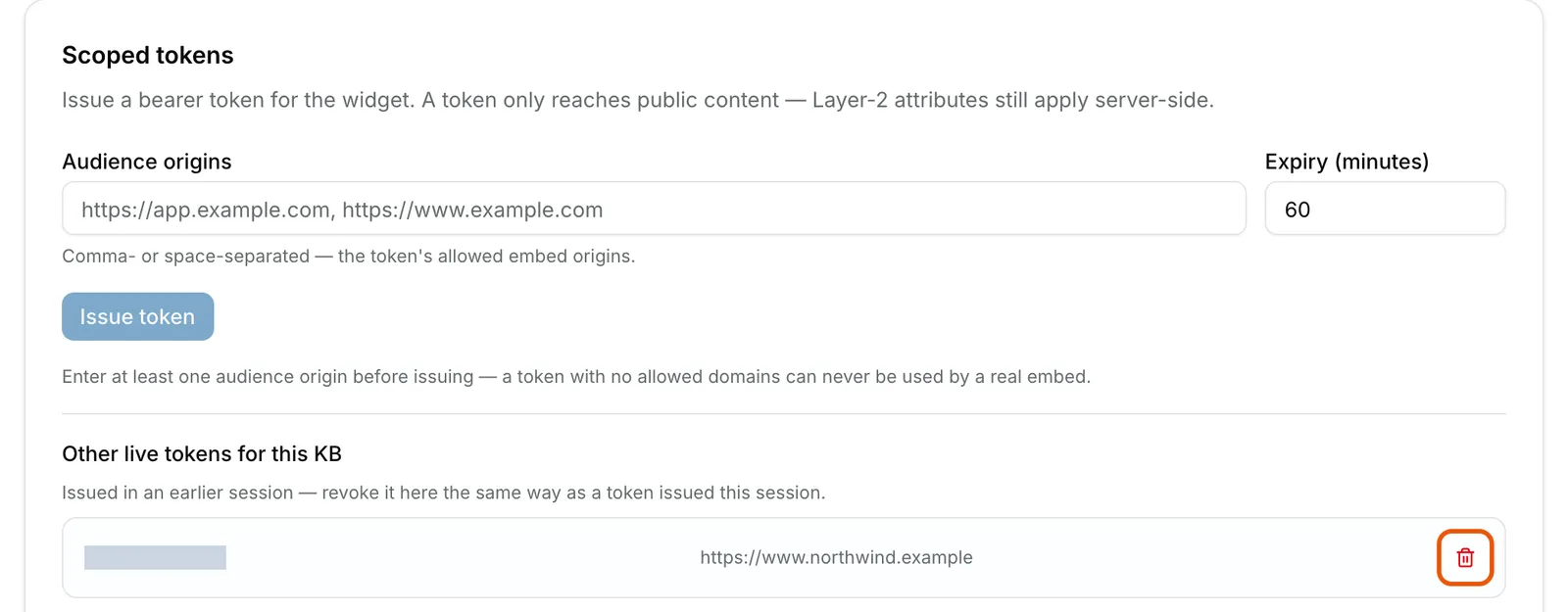
The Scoped tokens card: an Issue token form, and under Other live tokens for this KB one token for https://www.northwind.example, its reference hidden, with its Revoke button ringed. Enlarge


What success looks like
- A message starting Token issued appears above Embed code, with the minutes left.
- The widget appears on an allowed page as a launcher button; selecting it opens a chat panel headed Ask, with New chat at the top.
- A revoked token no longer appears under Scoped tokens, and the widget refuses questions.
Calling the API from your own system
The endpoints under API reference take the token of the person signed in, which suits trying them out. The note there saying no API keys exist for headless callers is out of date: an unattended system uses an API key, issued per integration in the Developers module in the top bar. See Managing API keys and the Knowledge Base API.
What a widget can and cannot do
A widget token reaches Public documents only, because it carries no role, department or group to match a tagged document. The widget keeps no history: every question is answered on its own.
Tokens expire after the platform limit, 60 minutes unless your platform has changed it, so a snippet pasted into a page stops working within the hour. For a live site, see The chat widget snippet.
The page's address must also be allowed under Allowed origins (CORS). That list can't be edited anywhere in the knowledge base, although the card says to use Settings. While it is empty, the platform's own list applies, so ask Elie support to add your site.
If something goes wrong
| Symptom | Likely cause | What to do |
|---|---|---|
| Issue token & generate stays greyed out. | No address is in Embedding domains, or your role lacks Knowledge Base · Setup - Create. | Add a domain, or ask a workspace administrator. |
| You no longer have the token. | Tokens are shown once. | Issue a new one, then revoke the old one under Other live tokens for this KB. |
| The widget loads but every question is refused. | The token expired or was revoked, or the page's address is not one of its domains. | Issue a token for that page's exact scheme, host and port. |
| The browser blocks the widget's calls. | The page is not on Allowed origins (CORS). | Ask Elie support to add it. |
| The widget answers, but not from documents you expected. | Those documents aren't Public. | Make them Public, or keep them for signed-in users. |
Next
- Knowledge Base widget API - the endpoints and the scoped token in detail.
- Managing API keys - a key for your own systems, instead of a widget token.
- Who can see a knowledge base - what Public means for a document.