Attaching a knowledge base
A knowledge base makes an application's calls searchable and gives chat something to answer from. Once one is attached, every new conversation is added to it as part of processing, and you can add the conversations the application already had.
- The Voice IntELIEgence app in your top bar.
- These permissions: Voice · Settings - Update, Knowledge Base · Component - List.
- A knowledge base that already exists and has been shared with you. Voice IntELIEgence attaches one but never creates one.
If Voice IntELIEgence isn't in your top bar, your role can't view it or your plan doesn't include it. Ask a workspace administrator, or see Permissions and module visibility.
Steps
Open KB & Chat
Open the application, select Settings, then KB & Chat.
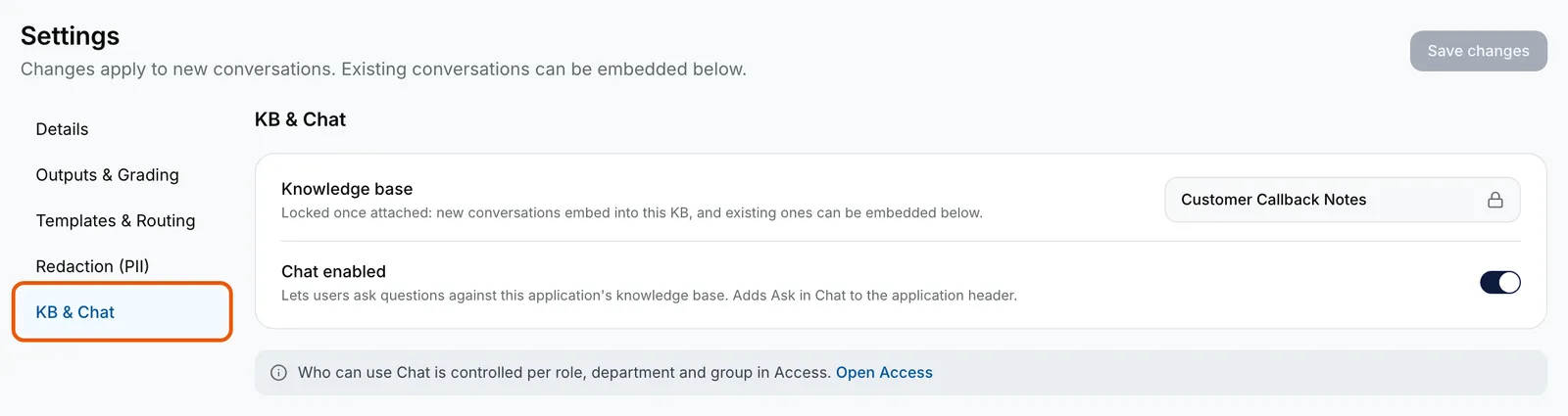
Customer Callbacks' Settings open on KB & Chat with KB & Chat ringed: Knowledge base locked to Customer Callback Notes, Chat enabled on, and the note that who can use Chat is set in Access. EnlargePick the knowledge base
Under Knowledge base, pick one from the list. Check it is the right one: once saved, it is locked.
Switch on chat and save
Turn on Chat enabled to add Ask in Chat to the top of the application, then select Save changes at the top. Who may use it is set on Access.
Embed the existing conversations
If the application already has conversations, a dialog opens after the save asking whether to embed them into the knowledge base. Every conversation starts ticked; untick any to leave out, or select Clear selection and pick a few. Select Embed now, or Later to do it another time from Embed existing conversations on the same page.
Follow the run
A banner across the application counts progress, and Embed existing conversations on KB & Chat shows the run with a count for each state. Rows that failed can be sent again with Retry all failed, or one at a time with Retry.

What success looks like
- Settings saved. Applies to new conversations. appears, and Ask in Chat appears beside Detail at the top of the application.
- Embedding 12 conversation(s) in the background. appears, and the banner reads Embedding existing conversations into your knowledge base with a running count.
- The run finishes as Completed, and the banner goes away.
What embedding an existing conversation does
It adds the conversation to the knowledge base as it was originally processed. Its review, outputs and exports do not change, and an approved conversation stays approved. A conversation added this way can be found only by tenant administrators and the person who uploaded it. It uses knowledge-base ingestion credit, so if credit runs out the run shows Paused: credit and carries on by itself when credit is back. One run takes at most 5,000 conversations.
Embedding existing conversations is switched on per workspace. If nothing is offered after you attach a knowledge base, only new conversations are added to it.
If something goes wrong
| Symptom | Likely cause | What to do |
|---|---|---|
| The Knowledge base list is empty and says knowledge bases are shared individually. | None have been shared with you. | Ask an administrator for access to an existing one, or create one. |
| The list is greyed out with a note about Knowledge Base. | Your role cannot use Knowledge Base, or your plan does not include it. | Ask an administrator. |
| Chat enabled is greyed out: Attach a knowledge base first. | No knowledge base is picked yet. | Pick one, then switch chat on. |
| The knowledge base is locked once attached and can't be changed. | A knowledge base was already attached, perhaps from another tab. | Keep using it. To use a different one, create a new application. |
| Rows show Embed failed. | The knowledge base refused or could not process them. Hover the badge for the reason. | Select Retry all failed, or Retry embed in a row's menu on Conversations. |
Next
- Asking questions about conversations - using the chat this switches on.
- Conversation statuses - the knowledge base badges.
- Knowledge base access - who can find what in a knowledge base.